

Leads
Review lead activity by date range, inspect conversation records, and queue follow-up actions from the Leads page.
The Leads section is the dealership lead-review workspace in the DealerAI portal.
Open it from Leads in the sidebar.
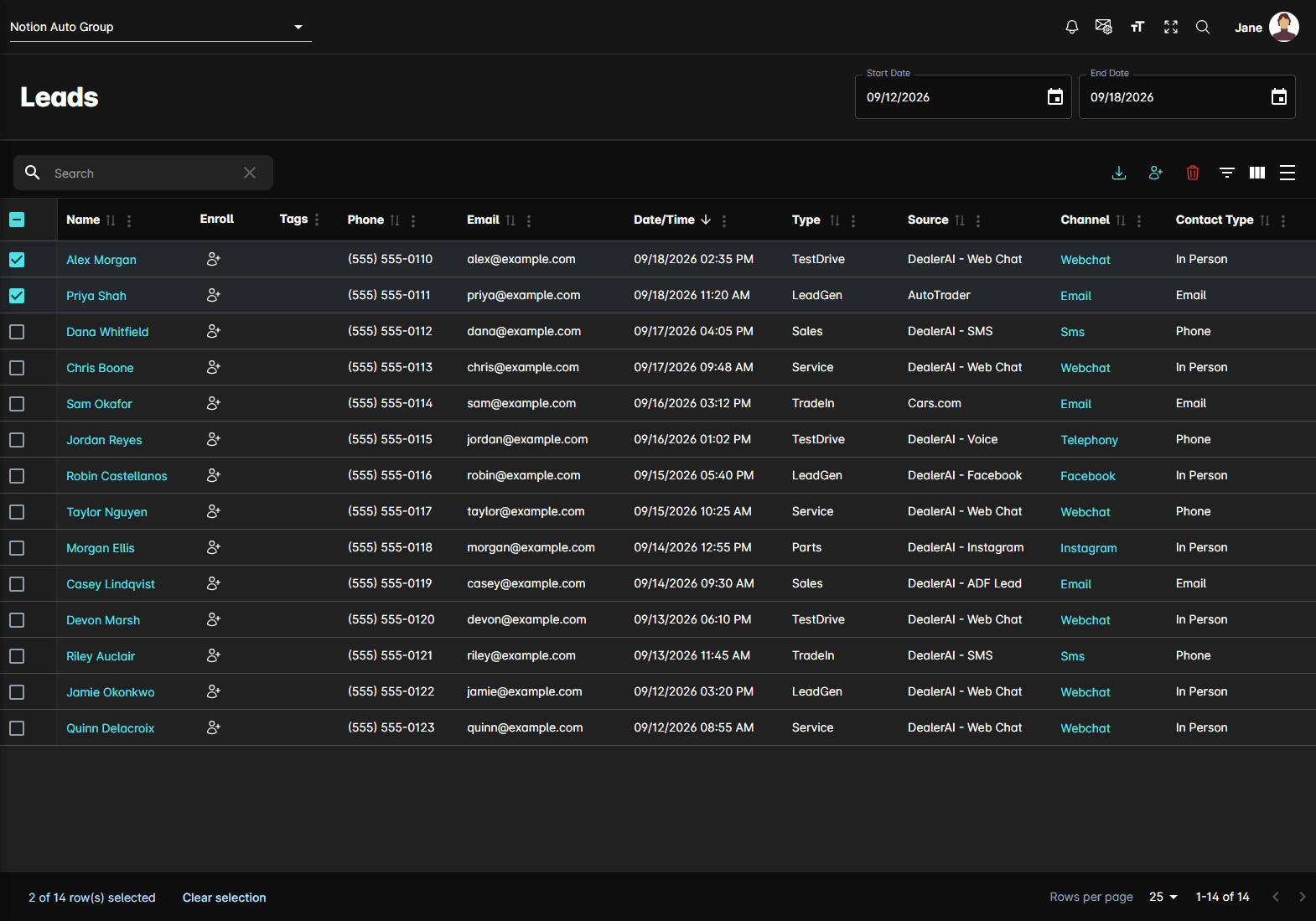
The date range
Start Date and End Date at the top of the page set the window the table covers. It opens on the last seven days. Changing either date reloads the list.
The table
| Column | What it holds |
|---|---|
| Name | The customer. It's a link when the lead is matched to a contact record — clicking it opens that contact |
| Enroll | Sends this one lead into a sequence |
| Phone and Email | The contact information the system captured. |
| Date/Time | When the lead was captured, in the dealership's time zone |
| Type | What the customer was after |
| Source | Where the lead came from |
| Channel | The channel the conversation ran on. Clicking it opens that conversation in a panel beside the table |
| Contact Type | How the customer asked to be reached — In Person, Phone, or Email |
Type
Type is the intent the system recorded, written as a single word:
| Type | Covers |
|---|---|
| Service | Service work |
| TestDrive | A test drive |
| Sales | A vehicle purchase |
| TradeIn | A trade-in valuation |
| Parts | Parts |
| LeaseReturn | A lease coming to an end |
| LeadGen | General interest captured by a lead-generation agent, with no more specific intent |
Toolbar actions
Above the table, on the right:
- Export to CSV — downloads every row matching your current filters, not just the page on
screen, as
leads.csv - Enroll to Sequence — sends the leads you've ticked into a sequence
- Delete — removes the ticked leads, after a confirmation
Enrolling a lead
Ticking rows and clicking Enroll to Sequence — or the Enroll button on a single row — opens a panel on the right.
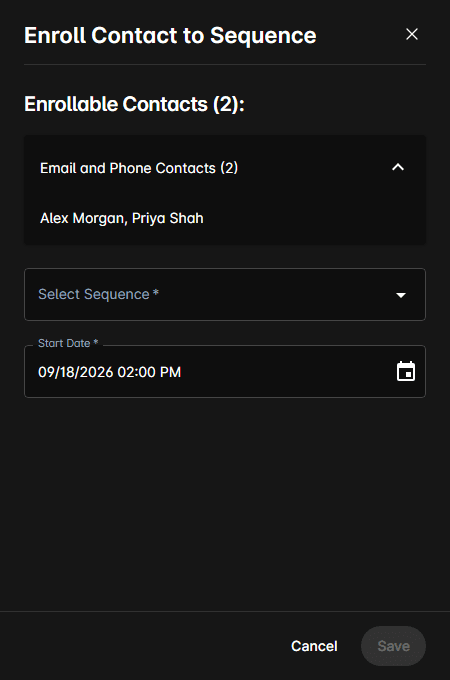
Enrollable Contacts counts who is actually going to be enrolled, grouped by what you can reach them on: Email Only, Phone Only, or Email and Phone. Expand a group to see the names in it.
- Select Sequence lists your active outbound sequences, narrowed to the ones that can run on the channels those contacts have
- Start Date is when the first message goes out, defaulting to the next quarter hour
Typical workflow
Notes
- Leads are per dealership. Switching dealership at the top of the page reloads the list.
- A lead is captured intent, not a booking. Anything with a time attached is in Appointments instead.
- Delete hides a lead from the list.