

Appointments
Review bookings the AI has made, in a calendar or a table, and follow up on them.
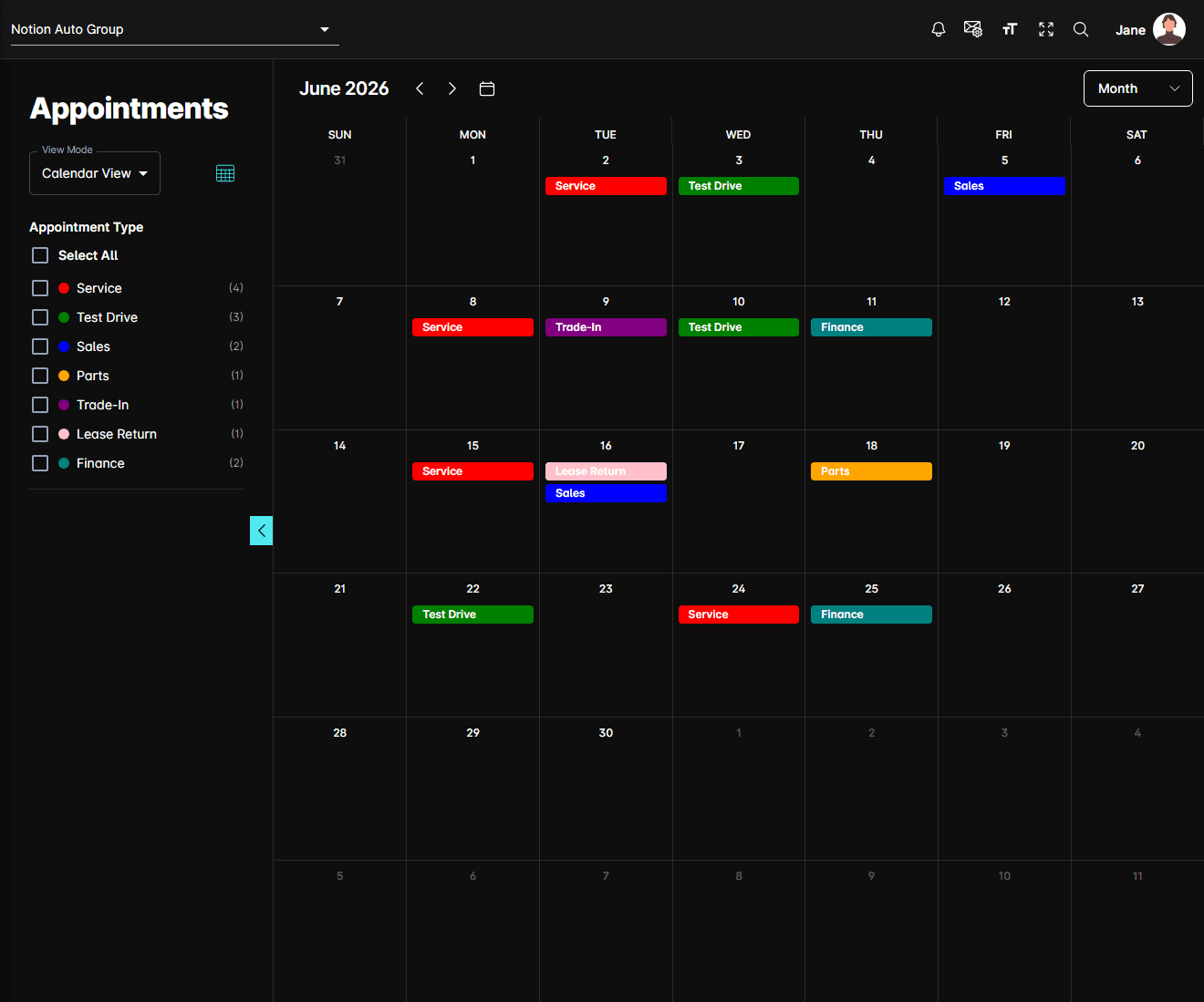
Appointments is where every booking the AI has made shows up. The same records are shown two ways — a month calendar for reviewing the schedule, and a table for working through the list — and a filter sidebar on the left drives both.
Open it from Appointments in the sidebar.
The filter sidebar
The sidebar is the same panel in both views, and the chevron on its right edge collapses it.
View Mode switches between Calendar View and Table View. The icon beside it does the same thing in one click.
Appointment Type
The six standard types, each with a colour swatch and a count in brackets:
| Type | Covers |
|---|---|
| Service | Service appointments |
| Test Drive | Test drive bookings |
| Sales | Sales appointments |
| Parts | Parts inquiries |
| Trade-In | Trade-in inquiries |
| Lease Return | Lease return inquiries |
Any custom agents you've created are listed below these, sharing a single colour.
The count beside each type is for the period you're looking at: the month on screen in calendar view, or the Start Date–End Date range in table view.
Calendar view
The header above the calendar shows the month you're on, with Previous, Next, and a Today button that jumps back to the current date. The button on the right switches between Month, Week, and Day.
Each booking appears as a coloured block on its day, labelled with its type and matching the swatch in the sidebar.
Appointment detail
Clicking a booking opens a panel beside it, headed with the appointment type, listing whichever of these the booking has:
- Name, Phone Number, and Email
- Appointment Time — the booked slot
- Vehicle, Service, or Vehicle Requested, depending on the type
- Booked On — when the AI created it
- Dealer Time Zone — the zone the times above are in
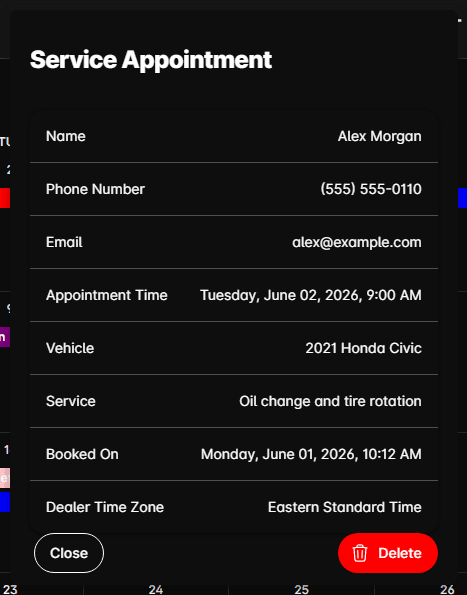
Close dismisses it. Delete removes the booking, after a confirmation.
Deleting a booking here removes it from DealerAI only. If it was also written into your DMS or scheduling system, cancel it there as well.
Table view
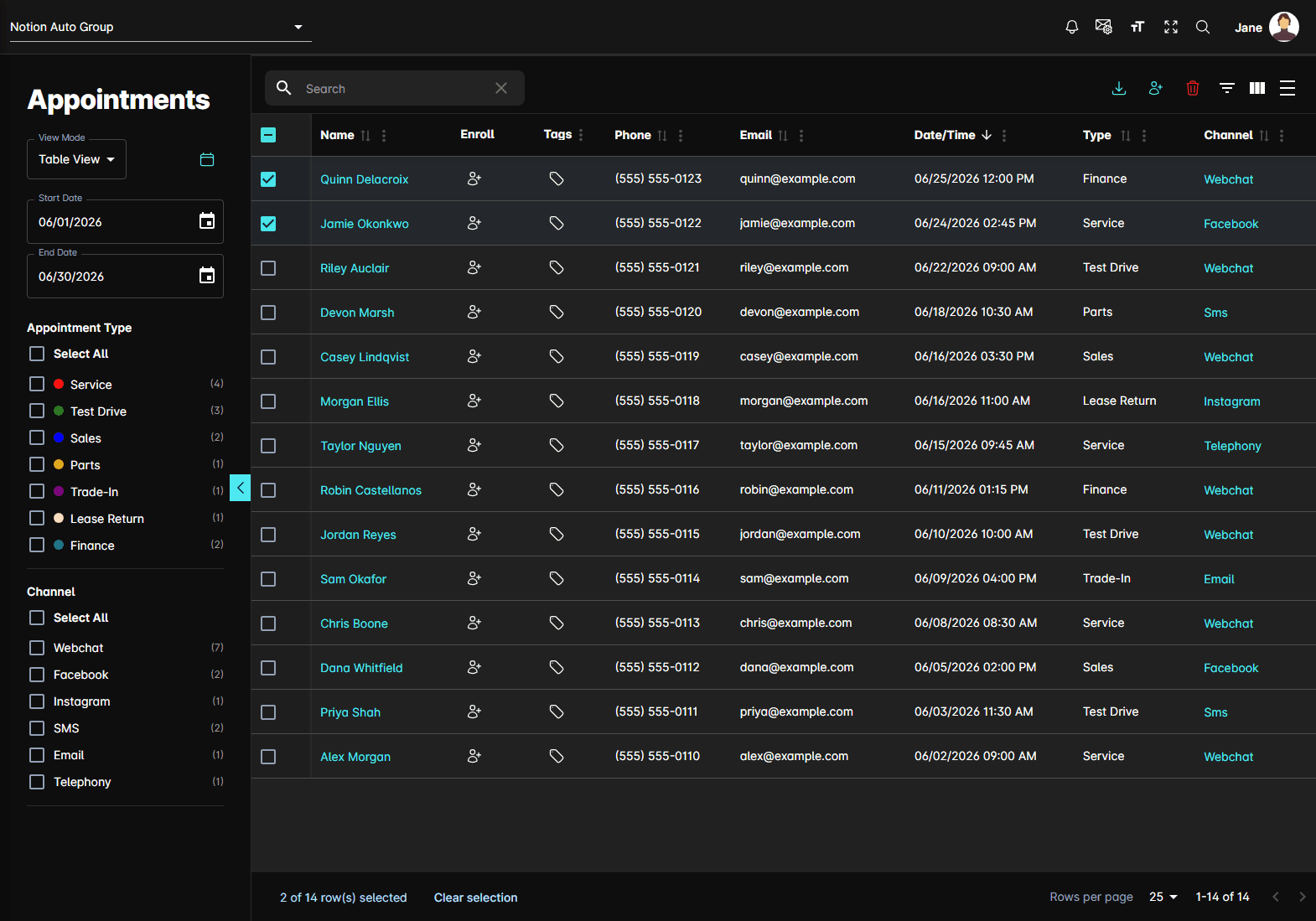
The table lists the same bookings as rows, newest first, with Name, Phone, Email, Date/Time, Type, and Channel. Search across them with the box above the table, or open the column filters for Name, Phone, and Email. Type and Channel are filtered from the sidebar rather than the column headers.
Extra filters
Two controls appear in the sidebar in this view only:
- Start Date and End Date — the range the table covers. Calendar view uses the month on screen instead
- Channel — Webchat, Facebook, Instagram, SMS, Email, and Telephony, each with its own count, and its own Select All
The columns
Two columns are links rather than text:
- Name opens that person's contact record, when the booking is matched to one
- Channel opens the conversation the booking came out of, in a panel beside the table
The Tags column opens Configure Appointment Tags, where you apply a tag to that one booking.
Toolbar actions
Above the table, on the right:
- Export to CSV — downloads every row matching your current filters, not just the page on
screen, as
appointments.csv - Enroll to Sequence — sends the contacts you've ticked into a sequence. The row's own Enroll button does one at a time
- Delete — removes the ticked bookings, after a confirmation
Typical workflow
Notes
- Appointments are per dealership. Switching dealership at the top of the page reloads the list.
- Times shown are in the dealership's time zone, which the detail panel names.
- What each agent can book, and when, is set in Agents — if a type never appears here, check that agent's Appointment Settings first.