

How to take over and pass back a conversation
Take a conversation over from the AI so you can reply yourself, then pass control back when you're done.
Taking a conversation over stops the AI from replying so a human can answer the customer directly. When you're finished, passing it back returns the conversation to the AI.
Both controls live in the speed dial menu — hover the grid icon in the top-right corner of the conversation and the menu fans out as a stack of labelled buttons.
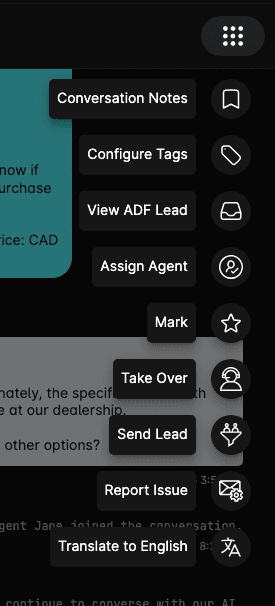
Take over a conversation
The message box only appears once you hold the conversation. If there's nothing to type into, it's because the AI is still the one replying — take the conversation over first.
Taking a conversation over also assigns it to you, so the rest of the team can see who is handling it. Your name shows up as the Take Over Agent in the customer details popover beside the customer's name.
While you hold the conversation, the AI still receives everything that's said and keeps the context, so nothing is lost when you hand it back.
Pass the conversation back to the AI
The AI only resumes when you pass the conversation back. It does not start replying again after a period of inactivity, or when the conversation looks finished — a conversation you took over stays yours until you explicitly pass it back. If you go off shift without passing back, the customer's next message goes unanswered.
Take over from a colleague
If a teammate already holds the conversation, the menu shows Take Over from followed by their name instead. Choosing it moves control — and the assignment — to you.
When to take over
- A customer asks a question that requires human judgment (pricing negotiation, escalation).
- You need to provide information the AI doesn't have access to.
- The conversation has become sensitive and needs a personal touch.
Tips
- Keep the handover short — customers expect fast replies once a human takes over.
- Pass the conversation back as soon as you're done, so the AI covers any follow-up message.
- If you're going offline and the conversation isn't finished, either pass it back to the AI or use Take Over from to hand it to a colleague who is on shift.
- You can take over and pass back as many times as you need in the same conversation.
- Leave a note with Conversation Notes before you pass back if the next person — or your future self — will need the context. See How to add conversation notes.
How to filter chats and use saved views
Narrow the chat list with the filter panel, then save filter combinations as saved views for one-click access.
How to send links and vehicle cards
Send links and call-to-action buttons back to the customer, and insert inventory vehicles into an email as a vehicle card.