

How to view contact activity
Read a contact's timeline to see every conversation, appointment, and sequence step before you get in touch.
Every contact has a Timeline — the record of what the agent and your team have done with that person. Use this to understand a customer's journey before engaging with them.
Open the timeline
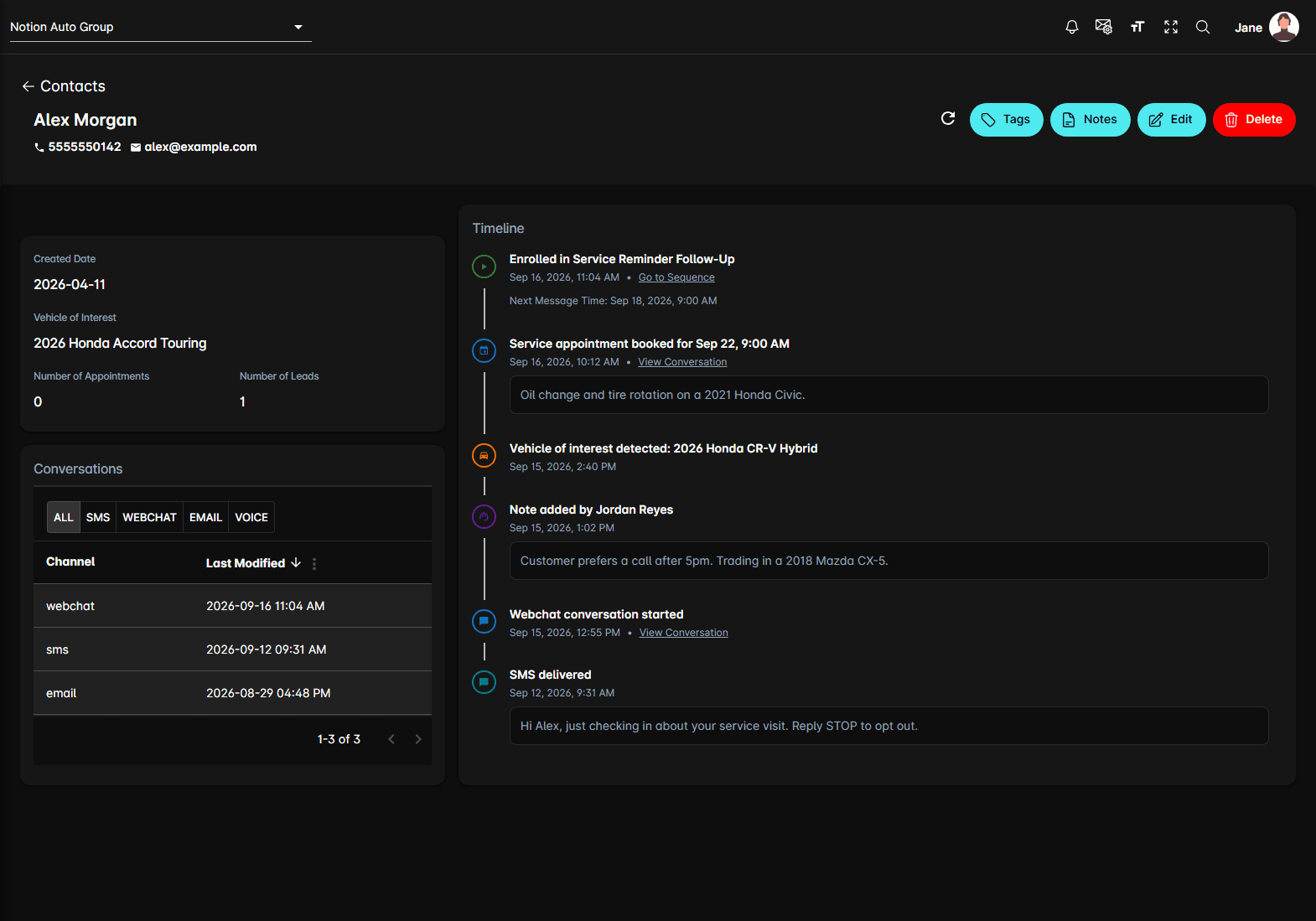
What the timeline shows
Each entry has a coloured icon for the kind of event, a one-line description, and the date and time. The events cover:
- Conversations starting, on webchat, SMS, email, or voice
- Messages sent and delivered
- Appointments booked
- Vehicles the agent detected an interest in — an ADF lead also shows the vehicle's photo
- Sequence enrolments, steps completed, and steps rescheduled
- Notes your team added to the contact
- Unsubscribes and blocks
Some entries carry more underneath: a sequence step shows its Next Message Time, a booking or an incoming lead shows the summary the agent wrote, and a note shows the note itself.
Follow an entry
Two links appear on entries that have somewhere to go:
- View Conversation opens the conversation the event came out of, in a panel beside the timeline
- Go to Sequence opens the sequence the event belongs to
Use the timeline for context
Before contacting someone, check:
- What vehicles they've asked about
- Whether a sequence is mid-flight, and when its next message goes out
- Which channel they actually answer on
- Whether they already have an appointment booked
The timeline is a record of events. To add your own context, use Notes in the contact's header — those notes then appear in the timeline. To leave a note against one conversation, use Conversation Notes.
Tips
- Check the timeline before messaging a customer by hand, so you don't cut across automated outreach that's already running.
- The Conversations card on the left is the same history grouped by channel — use it when you want to read the messages rather than the events.
- Number of Appointments and Number of Leads, just above it, are a quick read on how engaged someone is.