

How to edit an agent prompt
Modify the system prompt that controls how a specific AI agent behaves and responds.
Every agent already knows how to do its job. What you can change is the extra instruction layered on top of it — the dealership's own wording, rules, and exceptions. Editing the prompt lets you fine-tune how the agent communicates with customers.
Edit an agent's prompt
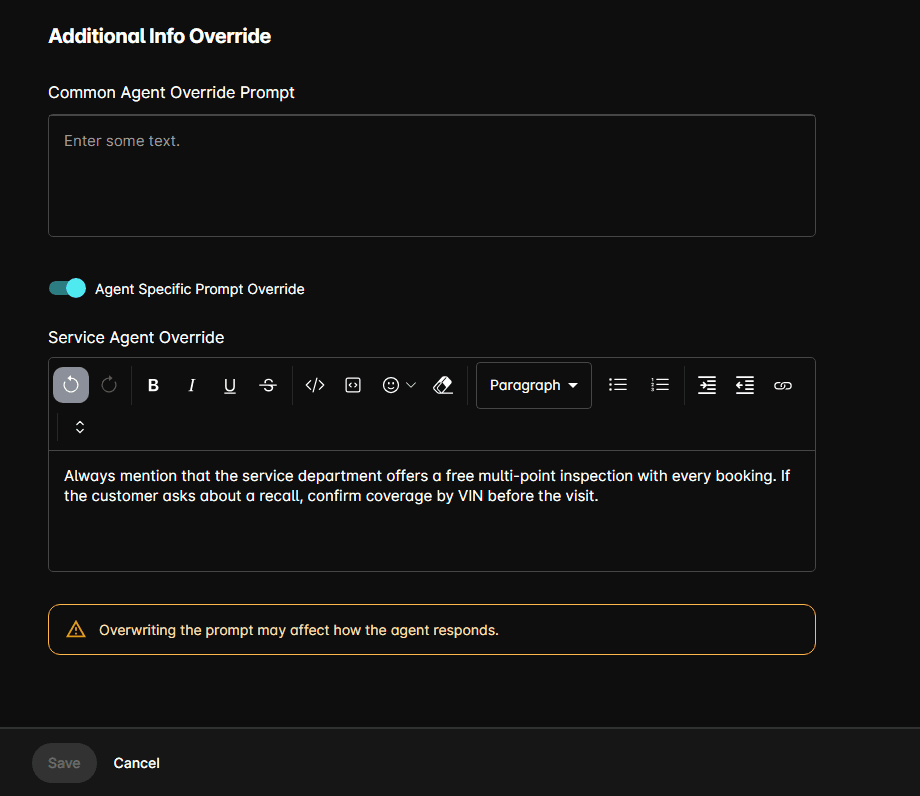
Turning the toggle off again leaves the text in place but stops it being applied.
The portal warns that overwriting the prompt may affect how the agent responds. Change one thing at a time and check the result in Preview. Review conversation logs after making changes to verify the agent behaves as expected.
The Common Agent Override Prompt
Directly above the toggle, Common Agent Override Prompt shows the instruction shared by every agent at this dealership. It is read-only here; edit it from Add → Edit Common Agent Prompt. See How to use the common agent prompt.
Both prompts apply together — the common prompt to every agent, the specific override to this one.
Tips
- Keep prompts focused — an agent with too many instructions may become inconsistent.
- Use bullet points for rules — the AI follows structured instructions more reliably.
- Put dealership-wide rules in the common prompt and only what's genuinely specific to this agent here.
- If something belongs to every conversation rather than one agent, it may belong in the Knowledge Base instead.