

How to set up outbound agents
Create a voice agent that places outbound calls, and send a test call to check it.
An outbound agent places phone calls on the dealership's behalf. You give it a name and a set of instructions; the portal derives its key, and you can optionally override the voice it uses and let it hand the call to a sales line.
Create an outbound agent
OUTBOUND_AGENT_<NAME> and can't be edited.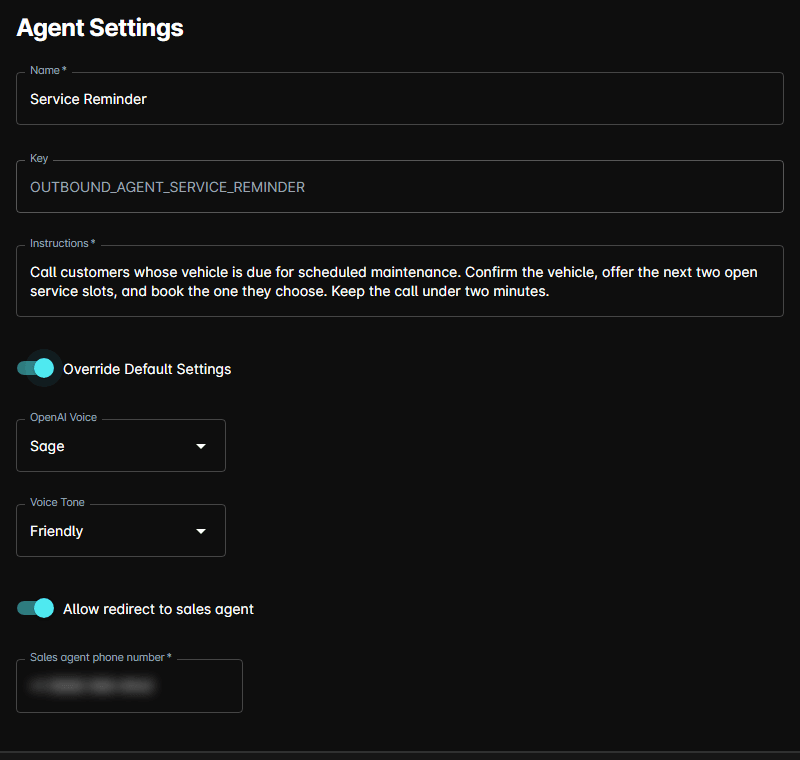
Override the default voice
Leave Override Default Settings off and the agent uses the dealership's voice configuration. Turn it on and three more fields appear:
| Field | What it sets |
|---|---|
| OpenAI Voice | The synthesised voice used on the call |
| Voice Tone | How that voice delivers the instructions |
| Allow redirect to sales agent | Lets the agent transfer the call |
Turning on the redirect adds a Sales agent phone number — the number calls are transferred to. All of these are required once the override is on.
Send a test call
Once an agent is saved, a Send Outbound Call form appears at the bottom of its page.
This places a real call to the number you enter. Use your own number, or a colleague's, to test.
Delete an outbound agent
Open the agent and click Delete at the bottom right, then confirm. The button isn't shown while you're creating a new agent.
Tips
- Keep the instructions to the purpose of the call. A long prompt makes a voice agent ramble, and callers hang up.
- Set the redirect number before you let an agent loose — a caller asking for a person with nowhere to go is the worst outcome of an outbound call.
- Coordinate outbound calling with your Reach follow-up so a customer isn't chased down two channels at once.