

Conversation Starters
Set the opening message and buttons the webchat shows on each kind of page, matched by URL rule.
Conversation Starters decides what the webchat opens with. You describe the kinds of page on your website — a vehicle detail page, a service page, your specials — and give each one its own opening message and buttons.
The webchat checks each page type's URL rule in list order and uses the first one that matches. When nothing matches, the Default page type is used.
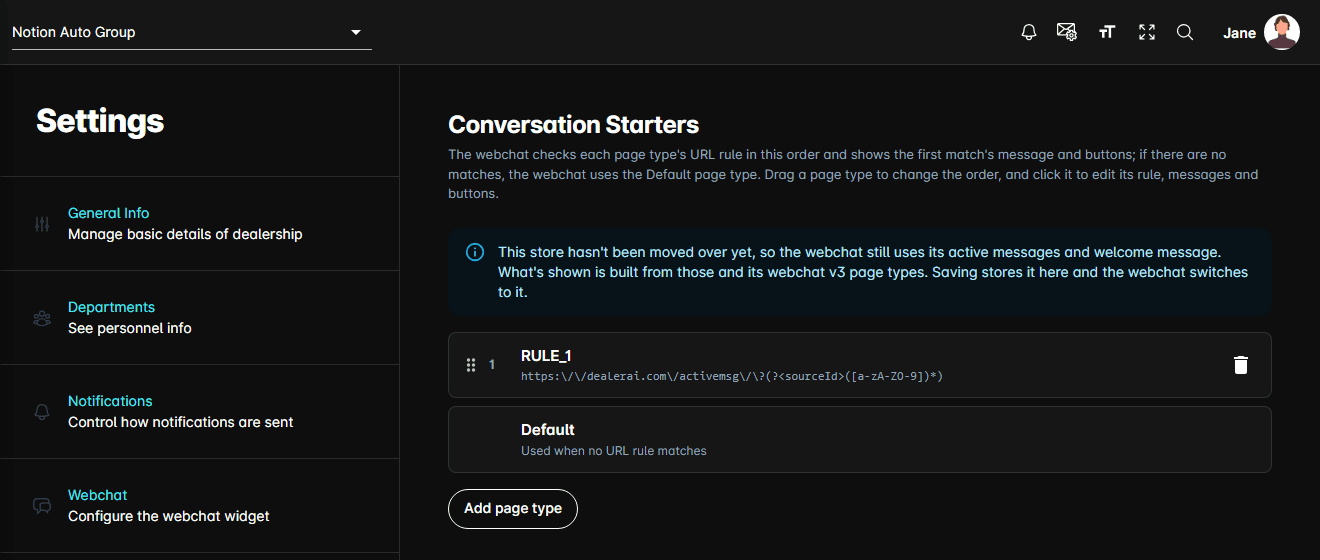
This page replaces Active Messages, the welcome message, and the default action buttons. Those sections are still visible on their old pages, greyed out and read-only. Until you save here, the webchat keeps using them.
The page type list
Each row shows the page type's position, its name, and its URL rule. The list is the match order:
- Add page type adds a row above Default and opens it for editing.
- Drag a row by its handle to move it up or down. A rule higher in the list wins over one below it.
- The bin icon deletes a page type, along with its rule and its starter. If a webchat smart trigger uses that page type, you are warned first — on save it is removed from those triggers, and a trigger left with no page types is turned off.
- A red outline and a line of red text mean something in that page type won't save.
Default is built in. It sits last, can't be renamed, deleted or reordered, and has no URL rule. It is also what a vehicle page falls back to when the car can't be found.
Editing a page type
Clicking a row opens it.
Name and URL rule
The Name is yours to choose and has to be unique. The URL rule is a case-sensitive regular
expression tested against the page's full address, including https:// and anything after ?.
Under the field, Test with a page URL takes a real page from your website and tells you whether the rule matches it, which identifier it captured, and whether a page type higher in the list would win that URL instead. Suggest a rule writes a starting rule from the URL you pasted, and How URL rules work opens a short guide with examples.
To let the AI talk about the specific car on a page, capture its identifier in the rule. They are tried in this order:
| Capture | What it is |
|---|---|
(?<sourceId>…) | The inventory feed's vehicle ID |
(?<vin>…) | The VIN |
(?<stockNumber>…) | The stock number |
If none is captured, or the captured car isn't in inventory, the car is looked up by the page's address in the feed instead.
Action
Action is what the webchat does on that page:
- Vehicle details (looks up the car on the page) — find the car and talk about it.
- Custom message — just show the starter.
Rotate messages
Rotate messages shows the page type's messages one after another instead of always the first one. It needs more than one message. With it off, extra messages are kept but not used.
Messages and buttons
Each page type has a Conversation starter per language your store supports, on its own tab.
- Message — up to 5 messages, 1,000 characters each. Type
@to insert a variable. - Buttons — up to 6, each with a Title (60 characters) and the Message sent to the bot (300 characters).
Variables are written in braces. {firstName} is required — a message that uses it is skipped when
there's no value. Write {firstName|there} to fall back to other text, {trim|} to fall back to
nothing, and put optional text in brackets, as in [ (Stock # {stock})], so the whole bracketed
part drops out when the variable is empty. Which variables are available depends on the field:
vehicle variables don't exist on Default, which has no car.
Translate … to other languages fills every other language tab from the one you're on. If those tabs already have copy, you're asked before it is replaced — and the result is a machine translation, so read it before saving.
Moving an existing store over
A store that hasn't been moved over yet shows a notice saying so, and what you see is built from its old active messages, welcome message, and webchat page types. Anything that couldn't be carried over cleanly is listed under Check before saving. Pressing Save stores it here, and the webchat switches to it.