

Non-Retail Inquiries
Route sponsorship, vendor, and partnership messages away from Sales and send them to their own recipients.
Not every message is a shopper. Sponsorship requests, vendor pitches, and partnership enquiries all arrive through the same channels as sales leads, and without somewhere else to go they land in front of whoever is working the sales inbox.
Non-Retail Inquiries gives them their own lane. Turn it on and the AI recognises this kind of message, treats it as its own lead type instead of a sales opportunity, and emails it to the people you nominate here.
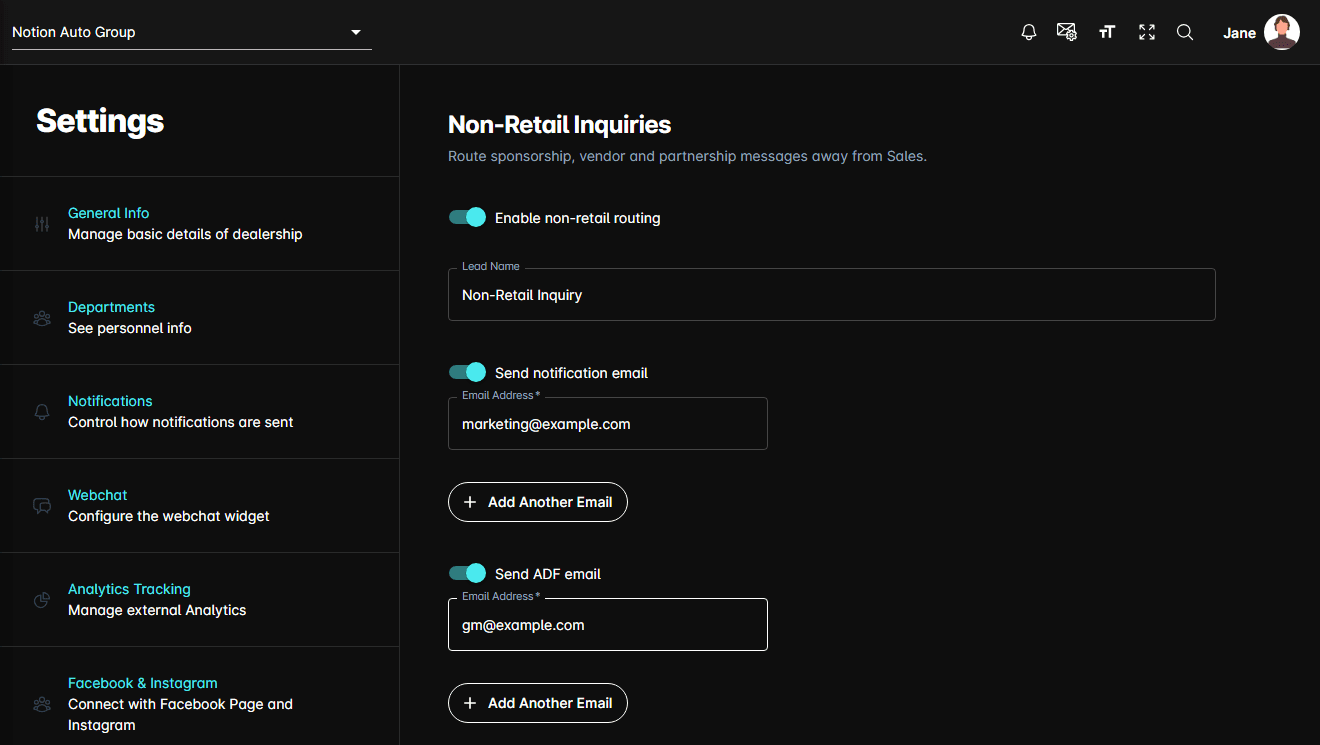
Turning it on
Where the leads go
Two independent deliveries, same as the other lead types:
- Send notification email — the readable HTML email a person opens. On by default.
- Send ADF email — the machine-readable ADF XML a CRM ingests. Off by default.
Switch either on and a list of recipients appears beneath it. Each address is validated, and a switched-on delivery needs at least one address before Save will accept the page.
These recipients are separate from your Sales lead recipients. That is the point of the page — send non-retail mail to the people who actually handle it, such as marketing or the GM, and keep it out of the sales queue.